
When you add a new record in Zotero, you can identify the author for that source. But sometimes, works have more than one author. Or works might have more than one type of role involved in their production (e.g., editors, translators). Whatever the scenario, though, Zotero has you covered.
Creator Types
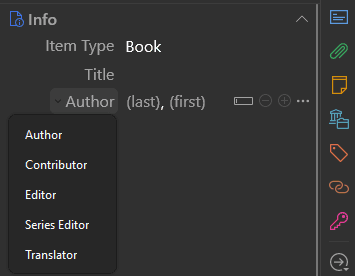
Within Zotero, you almost never see a Creator field as such. Instead, for different types of resources, have different types of creators available in the interface. For resources related to biblical studies, the most common creator types, include
Author,Contributor,Editor,Series Editor, andTranslator.
That said, there are several other creator types also (e.g., Artist, Recipient). You’ll see these types as options in the information pane if you select a related item type.1
For instance, with the Journal Article item type, you can select the Reviewed Author creator type. That creator type is particularly helpful if you’re citing an untitled book review.
Mostly, you can add manage creators directly in Zotero’s item information pane. But if you really need it, you can also add other types of creators in the Extra field.
How to Modify Creator Numbers and Types Directly
To modify a creator type, click the creator type that you see displayed (e.g., Author). Then, choose the appropriate alternative type.
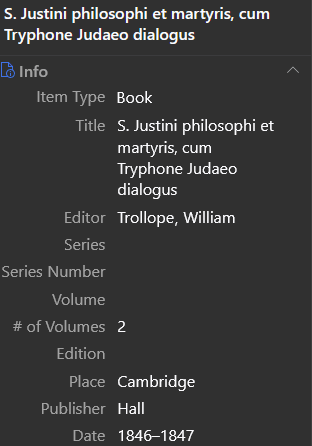
So, for example, you might have a work that you want to cite only under the name of the editor and not any other author. In this case, you’d choose the Editor creator type, and enter the editor’s name.
If the creator’s name has some kind of suffix (e.g., “Jr.,” “III”), enter that suffix in the first name field so that Zotero can properly manipulate the suffix.
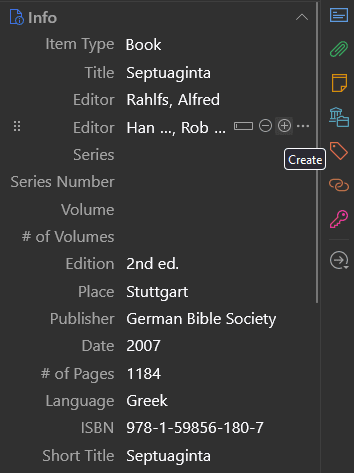
If your resource has more than one creator, use the + button to add additional creators as needed. Or if you need to remove a creator, use the − button to remove a creator (e.g., if imported bibliographic data lists as creators other people or entities that aren’t really creators for that resource).
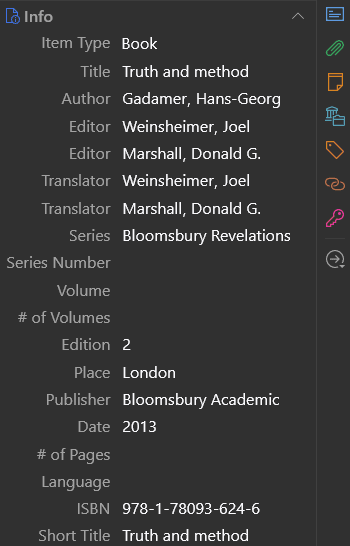
If you have a source where the same individual serves in multiple capacities (e.g., both as an editor and as a translator), enter that person’s name once for each capacity (e.g., once as an Editor and once as a Translator). As appropriate for the citation style you select, Zotero can check whether a record has the same name for multiple creator roles and produce appropriate output (e.g., “ed. and trans. Joel Weinsheimer and Donald G. Marshall”).2
How to Modify Creator Numbers and Types with the Extra Field
If can select an appropriate creator type in the item pane and enter the creator’s name there, that’s the best way to go. It’s the most straightforward method, and it will make Zotero’s item information pane most readable.
That said, there are some less common creator types that aren’t available from this selection menu at all. Or they might just not be available for the particular item type you need to use.
This is a niche enough case that I’ve had trouble finding a good example of a time when I’ve needed to address it. But if you come across one, you can use Zotero’s Extra field to enter creator information.
To do so, enter the citation style language (CSL) field name for the creator type you need to add (e.g., artist, reviewed-author), followed by
- a colon (
:), - a space, and
- the name of the creator you need to add to your record.3
That said, once you make such an addition, you may find that your citation output doesn’t change. If so, that’s because your citation style doesn’t know what to do with the creator type you’ve added (e.g., editor) in the context of the item type you’ve selected (e.g., Letter, from a volume of collected correspondence).
In this event, consider whether some other item type might be appropriate (e.g., Book Section). Or try your hand at making or explaining the improvements that need to be made to the citation style you’re using based on the authorities available for it.4 Once improvements get accepted into the style definition, Zotero will be that much more able to handle similar edge cases in the future.
Conclusion
Zotero can easily accommodate information about various types and numbers of creators. Most of the time, you can handle this information easily in the item information pane. But Zotero’s not limited to that—or even to what a given version of a style is currently able to produce.
For a full list of creator types that Zotero supports, search for “creator” in this reference page. ↩︎
Alternatively, you could use the
Extrafield to make an entry foreditor-translator. ↩︎For these field names, search for “creator” in this reference page. ↩︎
For instance, several different authorities interact to create SBL’s style. ↩︎