
Citing a grammar according to the SBL Handbook of Style seems like it should be pretty straightforward.1 In general, it is, but you need to account for several special features and cases.
What SBL Style Requires
1. Cite by section numbers where possible.
Instead of citing a grammar by page number, you should generally cite grammars by section number wherever possible.2 Doing so generally provides a more precise reference than simply indicating the page on which several sections may appear.
Unlike page references, however, section references take a special abbreviation. You’ll want to see
§at the beginning of a reference to a single section (e.g., “§50”) and§§at the beginning of a reference to multiple sections (e.g., “§§50, 55”) or a range of sections (e.g., “§§50–55”).
2. Cite by abbreviations where applicable.
SBL style authorities specify abbreviations to use when citing many common Hebrew and Greek grammars.3 You may find still other applicable abbreviations when you check IATG3.
For instance,
| You Cite | By the Abbreviation |
|---|---|
| Gesenius-Kautzch-Cowley | “GKC” |
| Blass-Debrunner-Funk4 | “BDF” |
| Smyth’s grammar as revised by Messing5 | “Smyth” |
A higher-level style authority for a particular project might direct you otherwise. But according to SBL Press,
All works cited by abbreviation should not be included in a bibliography, only in an abbreviation list.6
How to Get What SBL Style Requires
If you use a bibliography manager like Zotero that handles citation style language, your path to get what SBL style requires is pretty straightforward.
1. Install the current version of SBL style in your reference manager.
Other ways of getting this output automatically from Zotero may be on the horizon. But things are really quite easy if you have the current version of the SBL style installed.
Not long ago, you would have needed to install a custom variant of the main SBL style or edit the style yourself. That’s no longer necessary, however. The changes necessary to cite grammars and other sources by abbreviation are now part of the main SBL style.
You can get the style from the Zotero repository directly. Or click the button below to enter your email, and I’ll drop you a reply with this style and several others that you may find useful.
2. Tell your citation manager what abbreviation to use.
Zotero’s SBL citation style will do a lot, but it won’t know what abbreviation you want to use for a given grammar. So, you’ll then need to specify this abbreviation.
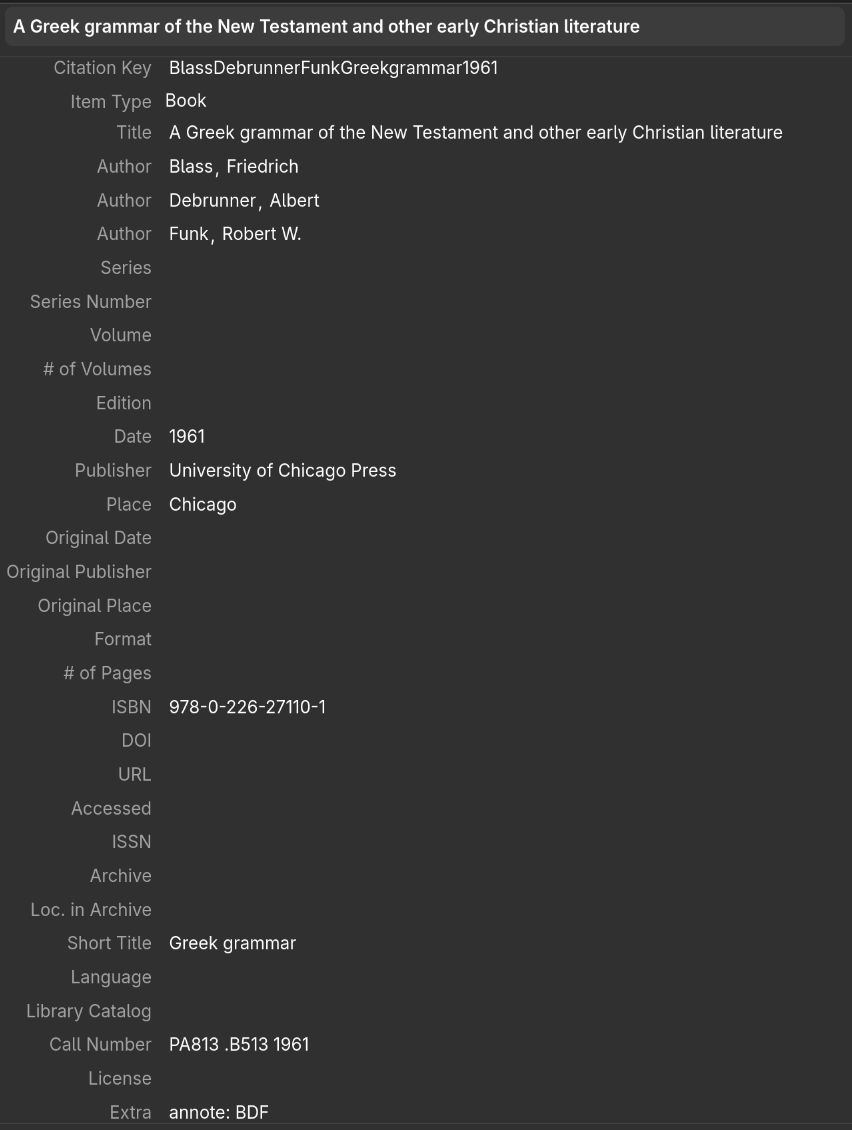 In Zotero, you’ll do this by using the grammar’s
Extra field to enter annote: , followed by the grammar’s abbreviation.
For instance, for Blass-Debrunner-Funk, you would include in Extra the text annote: BDF.
3. Add citations normally, choosing the section locator type where possible.
Once you have the record configured properly for the grammar(s) you need to cite, you can add your citations normally.
These citations will default to assuming Page-type locators.
So, when citing grammars, you’ll usually need to specify instead that you’re using a Section-type locator.
To do so
- in Pandoc markdown, use the abbreviation
sec.(e.g.,@BlassDebrunnerFunkGreekgrammar1961, sec.or@BlassDebrunnerFunkGreekgrammar1961 [sec. ]) or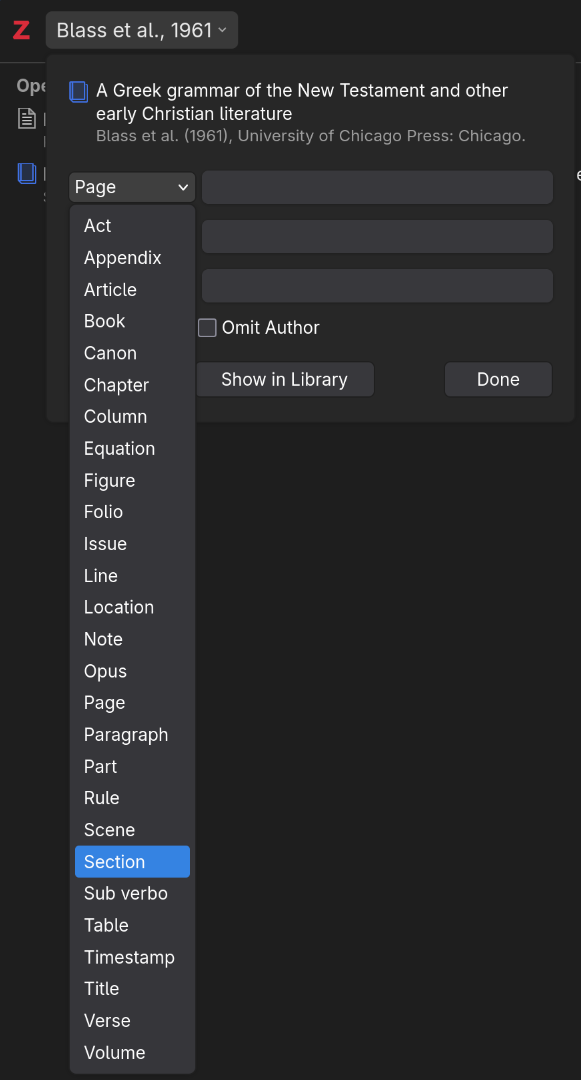
- in the Zotro citation dialog, choose
Sectionfrom the list of locator types available when you click on a given source that you’ve added to your current citation.
Enter the section(s) you’re citing normally (e.g., 50, 50, 55, 50-55).
If you enter a range and there are otherewise only numbers and commas in the locator field, just enter a hyphen (-), not an en dash (–).
The citation processor will probably convert the hyphen to an en dash for you. But it won’t convert en dashes for hyphens. So, using hyphens wherever possible for locator ranges makes it easiest to change to a different citation style if you need to at some point.
That said, do double check the output. Certain characters in the locator field (e.g., colons) can prevent the conversion of hyphens to en dashes like you’d normally expect.
The downside is that you might need to edit your bibliography, if you have one, to remove these sources and move them to an abbreviation list (per SBL style’s requirement).
But you will probably know pretty well which few sources are cited by abbreviations. So, you should be able to edit your bibliography as needed pretty quickly to relocate these sources.
4. Edit your bibliography as necessary.
If you have your citation manager add a bibliography to your document, this bibliography will default to including all sources cited in your document. But SBL style wants sources cited by abbreviation to
- be omitted from the bibliography and
- have their abbreviations defined in an abbreviation list in the front matter.
Again, you may have a higher-level style authority that modifies this convention. But assuming you do need to follow it, you’ll need to manually edit your document’s bibliography.
Pandoc Markdown
With Pandoc markdown, you’ll currently need to edit either the output document (e.g., DOCX) or adjust one of the stages between the markdown and that output. But you can also review progress on the discussion of this issue on GitHub.
Zotero Word Processor Add-in
If you’re using the Zotro word processor add-in and you’ve already added a bibliography that Zotero manages, you’ll need to manually edit the bibliography to remove the entry(ies) that you’ve included in your abbreviations list. As with manually editing a citation, manually editing the bibliography means Zotero won’t make any more automatic updates.
So, you’ll want to wait until the very end of your editing process to manually manipulate the bibliography. If you need to update it, you’ll have to reinsert the whole thing, which will add back any sources you’ve removed. That means you’ll need to pull them back out again.
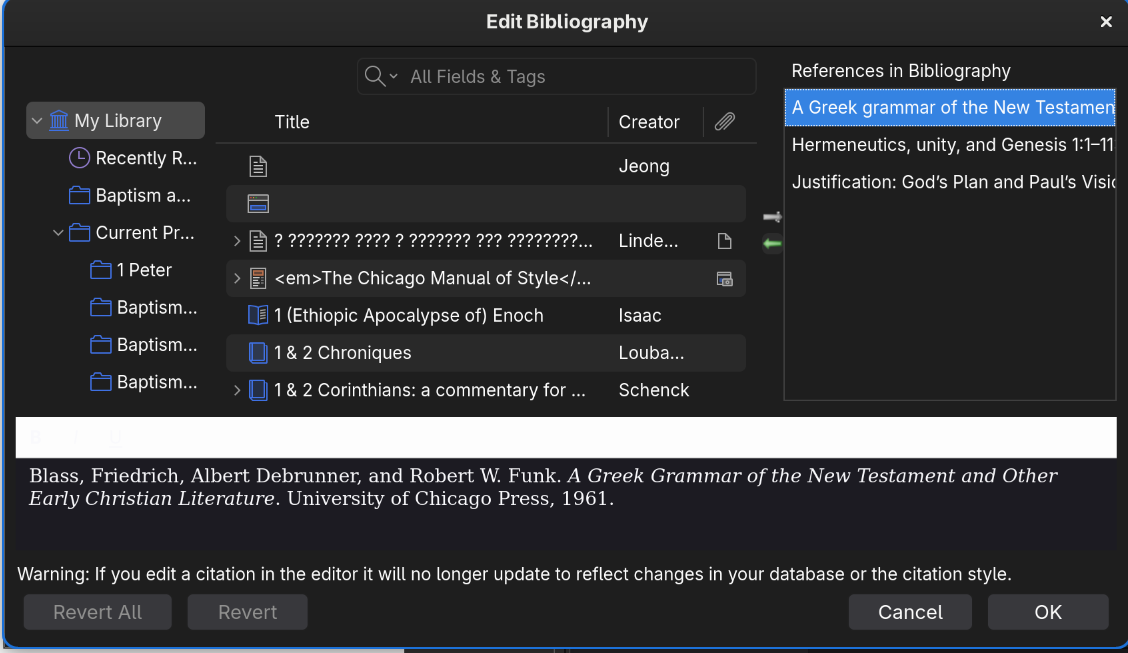
When you’re ready to remove entries that you’ve cited by abbreviation,
- Click the
Add/Edit Bibliographytoolbar button to open theEdit Bibliographydialog. - Click the entry you want to remove from the bibliography.
- Click the left-pointing arrow to remove the entry.
- Click
OKto close theEdit Bibliographydialog and refresh the bibliography.
You should then have a bibliography that excludes the sources you’ve cited by abbreviation.
Conclusion
In the end, citing grammars according to the SBL Handbook of Style is fairly straightforward once you get used to it.
If you want to cite them while using a reference manager, the process may include a few more steps to handle some of the specifics of what SBL style requires.
But with careful thought about the process for citing these kinds of resources, you can easily fold them into your existing citation process.
Discuss on Bluesky, LinkedIn, or Mastodon.Society of Biblical Literature, The SBL Handbook of Style, 2nd ed. (affiliate disclosure; SBL, 2014). Header image provided by SBL Press. ↩︎
“Citing Reference Works 6: Hebrew Language Tools,” SBL Handbook of Style, 18 April 2017. ↩︎
“Citing Reference Works 7: Greek Language Tools,” SBL Handbook of Style, 20 April 2017; “Hebrew Language Tools”;Society of Biblical Literature, SBL Handbook of Style, §8.4. ↩︎
On Smyth’s grammar, see also “Citing Smyth’s Greek Grammar,” SBL Handbook of Style, 8 March 2018. ↩︎
“Hebrew Language Tools.” ↩︎