
For many common sources, SBL style prescribes citation by abbreviation.1 Zotero can easily handle these custom citations. To get the proper output, you need to
- install a current version of the SBL citation style,
- understand what SBL style requires, and
- properly input information into Zotero.
1. Install a current version of Zotero’s SBL citation style.
You can install the “Society of Biblical Literature 2nd edition (full note)” directly from Zotero’s style repository. Or drop your email in the form below, and I’ll email you a copy of this style and a few others you might find helpful.
Output from this style, like all others, depends on the quality of the records in your Zotero database. But if you put information into the database correctly, this style will do a wonderful job. Your citations and bibliographies will reflect what SBL style requires.
2. Understand what SBL style requires.
In certain cases, SBL style asks you to cite a source simply by its abbreviation.
When to Abbreviate
The main cases where you’ll use abbreviations are for standard
- dictionaries, when citing unsigned articles,2
- grammars, and
- other works like ANF or NPNF.
Which Abbreviations to Use
The SBL Handbook of Style lists many common abbreviations. But as a group, the abbreviations it doesn’t list are also quite common. For those, you’ll consult the third edition of Internationales Abkürzungsverzeichnis für Theologie und Grenzgebiete (IATG).
3. Input information into your Zotero database properly.
In such situations, you’ll use the annote variable in Zotero’s Extra field.
For any record that has this variable, Zotero’s SBL style will
- skip nearly all of the normal parts for forming a footnote,
- ouput as your citation just the content of the
annotevariable, plus whatever locator you specify, and - still give you a properly-formatted bibliography entry.
As needed inside the annote variable, you can include rich text markup if, say, you need the abbreviation italicized.
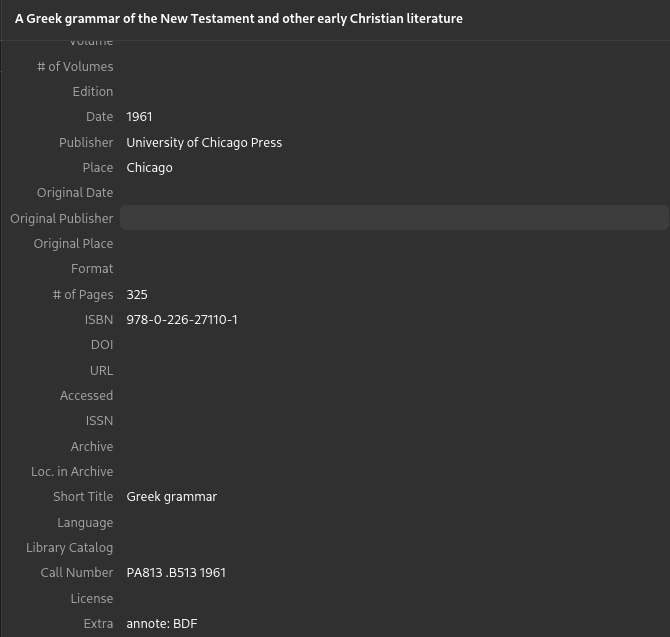 So, for example, if you enter
annote: BDF, your citation will include exactly “BDF”, plus whatever locator you specify.annote: <i>EDNT</i>, your citation will include exactly “EDNT”, plus whatever locator you specify.
Conclusion
And it’s that easy.
When you need a citation that’s just an abbreviation, add the abbreviation to Extra after annote: , and you’ll be good to go.
Society of Biblical Literature, The SBL Handbook of Style, 2nd ed. (affiliate disclosure; SBL, 2014), §§6.3.6–6.3.7. Header image provided by Zotero via Twitter. ↩︎
“Citing Reference Works 2: Lexica,” SBL Handbook of Style, 30 March 2017; “Citing Reference Works 3: Dictionaries (Word),” SBL Handbook of Style, 4 April 2017. ↩︎